What can dashboard agents do?
Access training for the programs assigned to them.
Create contacts (prospects/clients).
Onboard clients to the programs assigned to them.
View their own sales data and client list.
They cannot see the main account holder's data, billing info, payout info, the calendar, the website templates, other agents' activity, or account-level settings.
Adding a Dashboard Agent
Go to the 'Agents' section in your Umbrella Dashboard.
Click 'Add Agent'.
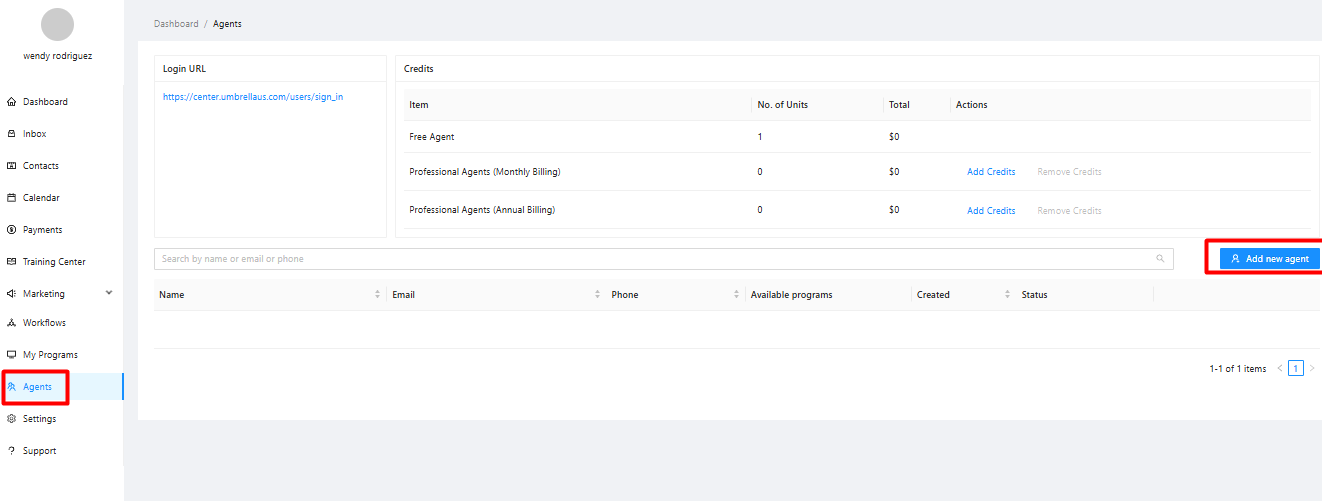
Enter their details (First Name, Last Name, Email, Phone, create a Password - meet minimum requirements). Add notes about their role if helpful.
Assign Products and Training: Select the specific Umbrella programs you want them to have access to (for training and client onboarding).
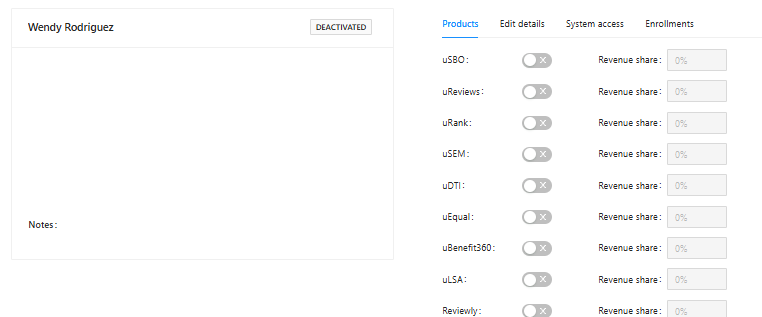
Save the agent profile.
Login URL: Agents log in using the same URL as members: http://center.umbrellaus.com
Cost of Dashboard Agents
The first agent added to your account is free.
Each additional agent costs $15 per month.
Removing a Dashboard Agent
Go to the 'Agents' section.
Find the agent you wish to remove.
Select the option to 'Delete' or 'Remove' the agent.
Confirm the deletion. Check the list to ensure they are removed.
Agent Permissions & Training Access
You control which Umbrella programs an agent can access via the Agent settings page during creation/editing.
Granting access to a program gives them access to its entire training and the ability to onboard clients to it.
You cannot grant access to only parts or specific modules of a program's training.
Agent Compensation / Payouts / Revenue Share
Umbrella Does Not Pay Agents Directly: All commissions from client billing done through Umbrella are paid to the main account holder (the member).
Member Responsibility: The member is responsible for calculating and paying their agents based on their own internal agreement (e.g., percentage of commission, flat fee). This is negotiated entirely between the member and their agent.
No Separate Bank Connection: Agents do not connect their bank accounts to the Umbrella platform.
Whitelabeling the Agent Dashboard
No, the Agent Dashboard login and interface cannot be whitelabeled. It's designed for internal team members/partners, not for resale as a separate platform access.
