
How to Onboard a Client to a Service:
First, either create a new contact or navigate to the detail view of the relevant existing contact.
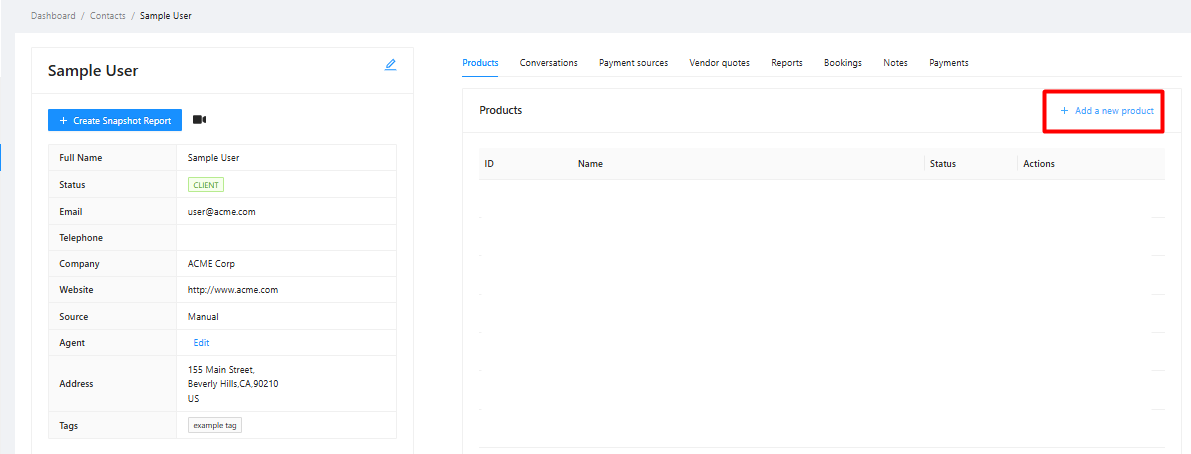
Ensure the "Products" tab is selected (it's the default view shown).
Click the "+ Add a new product" button/link on the right side above the product list.
Select the desired service from the dropdown list. Please note that you can only onboard one service at a time.
Fill out the required information for the selected service.
Note: You can onboard your business to any of our services by creating a contact for yourself and following the process outlined above
How to Cancel a Client's Service
Navigate to the specific contact's detail view.
Find the product you wish to cancel in their product list.
Click the Cancel option.

Fill out the required information, including the reason for cancellation.
If you don’t see a Cancel option, please contact our support team by submitting a ticket through the Help widget located in the bottom right of the Umbrella dashboard. Provide them with the details about the contact and the specific service you wish to cancel.